GS1 Digital Link
What is GS1 Digital Link
Getting Started with Loftware Digital Link
Getting Started with Loftware Digital Link

Getting Started with Loftware Digital Link
Getting Started with Loftware Digital Link
Getting Started with Loftware Digital Link

What is GS1 Digital link?
The GS1 Digital Link standard was developed to enable brands, retailers and stakeholders throughout the supply chain and beyond to meet this demand. It extends the power and flexibility of GS1 identifiers such as the Global Trade Item Number (GTIN) by making them part of the web.
This means that GS1 standards that are already used by 90 per cent of UK brands and retailers can now act as a gateway to online content that can strengthen brand loyalty, improve supply chain traceability information, include business partner APIs, patient safety information, and much more.
The true power of GS1 Digital Link is its flexibility, enabling connections to all types of business-to-business (B2B) and business-to-consumer (B2C) information. If you’re adding a QR code to a product using the GS1 Digitial Link standard, you’re not only providing a URL for people to scan, you’re also encoding GS1 identifiers – the very same identifiers that are relied upon throughout industry. This allows brand owners to retain full control while linking to any number of information sources from one symbol, saving packaging real estate and improving efficiency.

How does it work?
The GS1 Digital Link standard can be used with any type of 2D barcode. In most instances this will be either a data matrix or QR code. The 2D barcode code is embedded with a GS1 Digital Link, a unique sequence of characters that identifies a logical or physical resource used by web technologies – essentially a website URL with a product GTIN added onto the end.
Brands can choose to add additional levels of granularity by including subsequent identifiers within the data string of the URL. This could include a product’s batch and lot numbers, or, for serialised products, an individual item code or serial number.
GS1 Digital Link also allows apps and scanners to connect to specific user experiences by using additional data in a barcode to access specific information.
Resolvers
While Digital Link provides users with answers to their questions by consulting multiple resources, users will often want those resources to be directly relevant to them. What language does the user speak? For which country do they need information? The number of possible links to related information for a single item can quickly multiply. This means GS1 Digital Link needs to have rules in place that guide users to the most relevant content.
To achieve this, Digital Link uses a 'resolver'. Designed as ‘path finders’ rather than sources of information, resolvers redirect a request from one server to another. To put it simply, they can ‘resolve’ GS1 identifiers to one or more sources of information about an identified item.
For example, a resolver could link the GTIN stored within a URI to show traceability, nutritional or sustainability information about a food or drink product. For hardware, it could link to things like instruction manuals or how-to videos. At the same time, the resolver can link an identified item to information for business partners such as recall status APIs, master data, hazardous handling instructions and more.
Links to those information sources can be updated at any time, perhaps pointing to limited-time promotions or important updates. This means your barcode can work harder, acting as a gateway to unlimited resources to support your B2B and B2C goals.
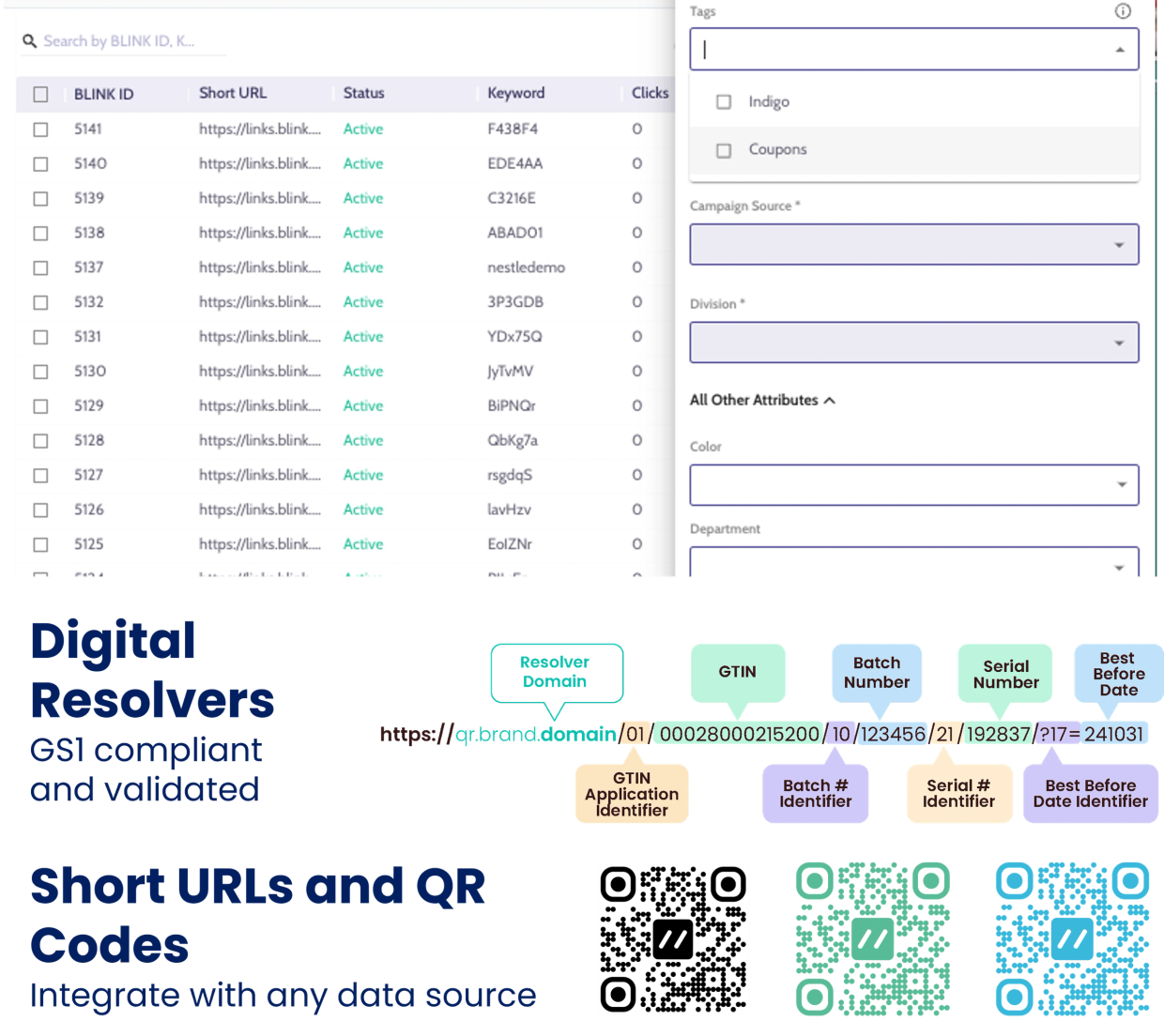
from Loftware Cloud to Loftware Digital Link, design GS1 compliant templates and configure manual and integrated printing solutions.
Resolver Domain
A resolver domain is a specific domain name that is served by the BLINK platform. All traffic on this domain is routed through BL.INK, so it must be a unique domain or subdomain.
Application Identifier
To ensure that GS1 Identification Keys can be recognized in a Web URL and used in offline processes such as point-of-sale systems, we structure the data using GS1 Application Identifiers. These two, three, or four-digit numbers indicate the role of the parameters that follow.
Global Trade Item Number (GTIN)
This is the unique GTIN value for the product. This is the minimum value required to provide a fully qualified GS1 link. Additional values may be included in the URL, based on the GS1 specification, to indicate other factors such as batch/lot number, serial number, expiration date, or product variant.
Frequently asked questions
Q: Does the Point of Sale system need to connect with Loftware Digital Link (BL.INK) to process the GTIN?
A: No, the POS operates independently of the Loftware Digital Link (BL.INK) service and no traffic is required to be sent to Loftware Digital Link (BL.INK) during a typical checkout experience.
Q: Can I use my website domain name with Loftware Digital Link (BL.INK)?
A: It is possible (and recommended) to use a unique subdomain on the brand domain name to maintain clear branding and provide full routing via Loftware Digital Link (BL.INK). This provides the maximum branding and control over the experience.
Q: How does Loftware Digital Link (BL.INK) route the GS1 Digital Link?
A: When scanned at checkout, the scanner sees the GTIN URL and extracts the necessary values. When this same code is scanned with a traditional QR code reader, the URL is routed like a standard web link. The redirect request is sent to Loftware Digital Link (BL.INK) for routing. Loftware Digital Link (BL.INK) sees the GS1-formatted URL and processes the URL and parameters per the configuration settings. This allows the single QR code to have multiple outcomes based on URL parameters and environmental settings such as geography, language, date, and device.